5. Formulas and recipes#
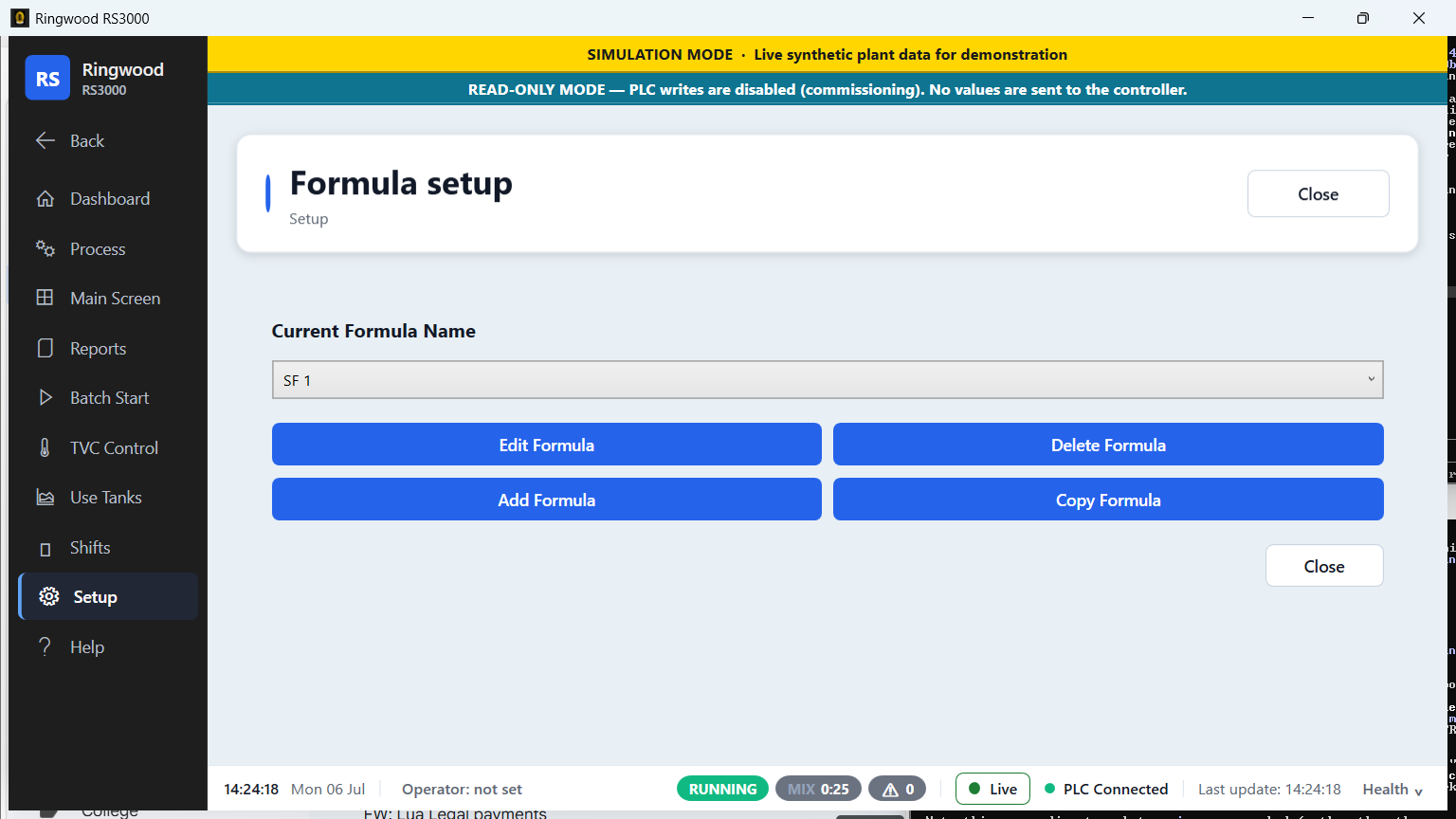
Formula editing lives under Setup, so it is supervisor-gated by default. This chapter covers it in full anyway, in operator terms, because understanding what a formula screen shows you helps make sense of what you see on Batch Start, and because a shift supervisor is often the one who actually opens these screens.
Units: pounds#
Recipe amounts (FormulaSteps.PresetAmount, the PLC formula bank, and
batch preset/actual figures) are native pounds. This is a settled,
evidence-backed verdict, not a display convention (source:
docs/production-readiness/RECIPE_UNITS_VERDICT_2026-07-31.md in the Ring
repository, built from four independent primary sources). Do not carry any
different unit assumption from an older document or from memory of the
legacy app.
Note: Setup → Unit Settings ("Display Units") lets you choose independent display units for Volume, Weight and Temperature. Its own on-screen description is exact: "Temperatures, levels and weights are converted for display only. PLC values, batch math and stored history stay in native units." Changing it never touches a stored recipe amount — only how the number is drawn on screen.
Viewing and editing a formula: Formula Edit#
Setup → Formula Edit shows one formula at a time. The header carries the Formula Name field and two always-visible read-outs computed live from the step list: Calculated Weight (lbs) and Calculated Volume (gal), plus a Commercial Solids percentage.
The step table#
One row per step: Step number (read-only, position in the sequence), Operation, Amount, and Time (seconds). The recognized operation types are a fixed list:
No Step / Pass · Water · Finish Water · Steam · Domestic Starch · Caustic 50% · Caustic 3% · Primary Borax · Secondary Borax · Liquid Additive 1–6 · Pump to Storage · Batch Inspect · Manual Starch Addition · Batch Done · Measure Viscosity · Turn on Agitator · Turn off Agitator.
Move Up / Move Down reorder the selected step. Below the table, an editor row lets you pick an operation, type an amount and time, and:
- Add — appends a new step at the end.
- Insert — inserts before the currently selected step.
- Delete — removes the selected step (with a confirmation prompt).
- Accept — applies your edits to the currently selected step in place.
Amount limits — two very different kinds#
Ring checks a typed amount against limits in two different ways, and it matters which one you are looking at:
- A hard, absolute ceiling (10,000 lbs). This applies to every step on every formula number, no matter the operation, and exists purely to catch a garbled or corrupted value before it can reach the database or the controller. You will see a plain validation error if you exceed it — there is no negotiation.
- A per-operation advisory band, shown in the table below. If your typed amount falls outside an operation's band, Ring asks — it never silently substitutes anything. The dialog shows your entered value, the band, and a suggested default, with two buttons: Yes (replace with the suggested default) and No (keep what you typed). No is the safe default — pressing Enter keeps your value, not the suggestion. These bands are explicitly not verified against this specific plant's real recipes (the code notes that live plant Steam charges run 100–110 lbs, well outside an older, narrower band that used to be silently enforced) — so if you know your value is correct, keep it.
| Operation | Advisory band (lbs) | Suggested default |
|---|---|---|
| Water | 8 – 1,500 | 25 |
| Finish Water | 8 – 100 | 60 |
| Steam | 25 – 120 | 100 |
| Domestic Starch | 15 – 750 | 15 |
| Caustic 50% | 3 – 60 | 15 |
| Caustic 3% | 1 – 60 | 5 |
| Primary / Secondary Borax | 0 – 20 | 0 |
| Liquid Additive 1 – 3 | 3 – 100 | 5 |
| Liquid Additive 4 – 6 | 1 – 180 | 1 |
| Manual Starch Addition | 15 – 750 | 15 |
| No Step/Pass, Pump to Storage, Batch Inspect, Batch Done, Measure Viscosity, Turn Agitator On/Off | 0 – 0 | 0 |
Operations with no meaningful amount (the last row above) carry a band of 0 – 0 — leave the amount at 0 for these. Typing anything else raises the same out-of-range confirmation dialog as any other operation, with 0 as the suggested default; it is not silently accepted.
Note: Decisions on the advisory-band prompt are logged either way (with the entered value, the band, and whether you kept it or took the default) — so choosing to keep an out-of-band value is a recorded, deliberate choice, not a silent override.
Saving: Apply#
Apply saves the formula, with several checks along the way:
- The formula name must include a number Ring can read (e.g. "Formula 1" or "Formula 12 (Copy)") — a name it cannot parse a number from is rejected with an explanation.
- If you are saving a copy back onto the exact slot it was copied from, Ring refuses outright — you must pick a different number so the original is never silently overwritten.
- If you are saving a copy onto a different, already-populated slot, Ring warns you how many steps that slot currently has and asks you to confirm before replacing them (defaulting to No).
- A confirmation dialog states plainly whether this save will also reach the controller: "Save formula number N and all listed steps to the database and to PLC tags Formula_NN_Preset_Operation / Amount / Mix...?" for formulas 1–6, or a database-only equivalent for anything higher.
- A formula bank slot (1–6) supports a maximum of 30 steps; exceeding that fails the whole save atomically (nothing is written to either the database or the controller) rather than leaving the two out of sync.
What you see afterward depends on exactly what happened, and Ring is specific about it — see What is protected below for the four different outcome messages.
View History opens a read-only list of past saved versions of this formula — version number, when it was applied, and a preview of its steps — useful for confirming what actually changed and when. It has no restore button; it is a viewer, not an undo tool. Viscometer Settings jumps to this formula's calibration coefficients — see 03a-main-screen-reference.md §Viscometer (a shorter walkthrough also exists inside the app at Help → Operator Runbook §9.5).
Formula bank exchange with the PLC: Formula Exchange#
Only formula numbers 1 through 6 are addressable in the controller's
formula bank (Formula_01…Formula_06) — those are the only formulas the
plant can actually run a batch from. Higher formula numbers exist in Ring's
own database as storage/reference only and are never sent to the
controller.
Setup → Formula Exchange swaps the full step list between two
formula numbers — for example, exchanging Formula 2 with Formula 7 moves
Formula 7's recipe into Ring's database and rewrites the controller's
Formula_02 slot with it, while what used to be Formula 2 becomes Formula
7 (database-only from then on). This is how a recipe that only exists above
slot 6 gets promoted into a slot the controller can actually run, and vice
versa for retiring one.
Screen layout: a Current Formula Name picker, an Exchange Formula Name field (type or pick a name), a read-only preview of the exchange formula's current steps (Step / Operation / Amount / Time) so you can confirm what you are about to bring in before committing, and an Accept button.
What Accept checks, in order:
- Both names must be filled in and must parse to a formula number.
- The two numbers must be between 1 and 30, and must be different from each other.
- A confirmation dialog states plainly whether the pair touches the PLC — "Any formula 1–6 in this pair will also be written to the PLC..." — or that both numbers are database-only.
- If the exchange would touch the PLC and the connection gate is not currently open, Ring asks whether to proceed database-only instead (defaulting to No) rather than silently downgrading the operation.
Warning: Because this can rewrite a live controller formula bank slot, it goes through the exact same write-safety interlock as every other PLC write — see below. If the write cannot be verified by reading it back, the controller's bank is left in an unknown state and Ring will not silently pretend the database and the controller agree.
What is protected#
Every formula-bank write, whether from Formula Edit or Formula Exchange, goes through the same interlock before anything reaches the controller.
The write can be refused before anything is sent#
In plain terms, nothing is sent if any of the following is true:
- Ring is in read-only mode (the pre-cutover default).
- Ring is in demo mode.
- Writing to the PLC formula bank is held pending controls sign-off
(
PlcSettings.EnableFormulaBankWrite) — this is a separate switch from read-only mode, and it ships off by default, independently of whateverReadOnlyModeis set to. It does not automatically turn on at the write-enabled cutover. - Any batch is currently running anywhere on the plant — not only on a tank you think this formula affects — or Ring cannot confirm from the controller that it is idle. This interlock is deliberately bank- and tank-agnostic: Ring cannot prove which bank a running batch is actually consuming (the controller copies the recipe into its own working tags at start, nothing rules out a mid-batch re-read, and a mixer batch can be fed by a use tank pointed at a different bank), so it refuses on any running batch rather than risk guessing wrong. An unreadable step number counts as "not idle," never as "idle" — when in doubt, Ring refuses.
- The PLC link is not in a write-ready state (see 01-getting-started.md).
- The step number is out of range (must be 1–30) — rejected before anything is sent.
- The PLC endpoint itself is not configured.
Warning: Because the controls sign-off switch above is independent of read-only mode, do not assume formula-bank writes will start working the moment the plant's 2026-09-08 write-enabled cutover happens. If Formula Edit or Formula Exchange still reports the write as "held," that is this separate switch, not a leftover read-only setting — see the exact wording below.
What you're told, and what it means#
The database save and the controller write are reported separately — Ring never lets you believe a controller write happened when it didn't:
| What you see | What actually happened |
|---|---|
| "Formula saved to the database and to PLC tags Formula_NN..." | Both the database and the controller were updated, and the controller write was read back and verified. |
| "Formula saved to the database... The PLC write was SUPPRESSED — the system is in read-only mode..." | Database only. Read-only mode is on. Reopening this formula will show the controller's values, not your unsent edits. |
| "Formula saved to the database... The controller was NOT updated: writing recipes to the PLC is HELD pending controls sign-off..." | Database only, for the separate reason above — not read-only mode. The remedy is a controls sign-off, not the Read-Only Safety switch. |
| "Formula saved to the database. Only formulas 1–6 are written to the PLC." | Database only, because this formula number is simply not one the controller can run (7 or above). |
The only outcome that counts as a proven success is one where the write was both sent and read back from the controller to confirm it landed. If a write is attempted but cannot be verified afterward, the controller's recipe bank is left in an unknown state (possibly a mix of old and new values) — Ring shows a failure dialog and will not let a database save proceed as if that write had succeeded.
Sources verified#
Ring/Views/Setup/FormulaEditScreen.xaml,FormulaEditScreen.xaml.cs(validation,ConfirmAmountAgainstBand,ApplyButton_Click)Ring/Views/Setup/FormulaExchangeScreen.xaml,FormulaExchangeScreen.xaml.cs(AcceptButton_Click)Ring/Views/Setup/FormulaHistoryDialog.xaml,FormulaHistoryDialog.xaml.cs(read-only, no restore)Ring/Views/Setup/ViscometerSettingsDialog.xaml(referenced, not re-verified in depth)Ring/Services/FormulaIngredientAmountLimits.cs(per-operation bands incl. the 0–0 bandless-operation rows, absolute ceiling)Ring/Services/PLC/FormulaBankWriteInterlock.cs(bank-agnostic-on-purpose comment, :125-129; unreadable current_step fails closed, :159-169)Ring/Infrastructure/Configuration/AppSettings.cs(EnableFormulaBankWritedefaultfalse)docs/production-readiness/RECIPE_UNITS_VERDICT_2026-07-31.md(referenced, not link-quoted — see the note above)- OPERATOR_TRAINING_RUNBOOK.md §9.5 (referenced, not link-quoted)