06 — UI Architecture#
Who this is for. Anyone adding or changing a screen, a control, a theme token, or a localized string.
What you'll learn. The two-tier UI reality and which tier your new screen
belongs in; how the shell, the hosted-screen pattern and FitHost work; what
lives in each screen area; the resource-dictionary system and the thirteen-locale
rule; converters; touch and legibility conventions; and the one UI rule that is
a safety rule.
6.1 Ring is not uniformly MVVM, and pretending otherwise will mislead you#
ARCHITECTURE.md
is the authority here and describes the split honestly. In summary:
Tier 1 — VM-driven. These set DataContext = _viewModel in code-behind and
bind. They are the process-data screens and the best-tested UI code in the repo:
MakeReadyTank, CausticAndBorax (which shares MakeReadyTankViewModel),
StorageTankGroup, StorageTankDetailWindow, UseTankGroup, TVC, Alarm,
and the Use Tank windows.
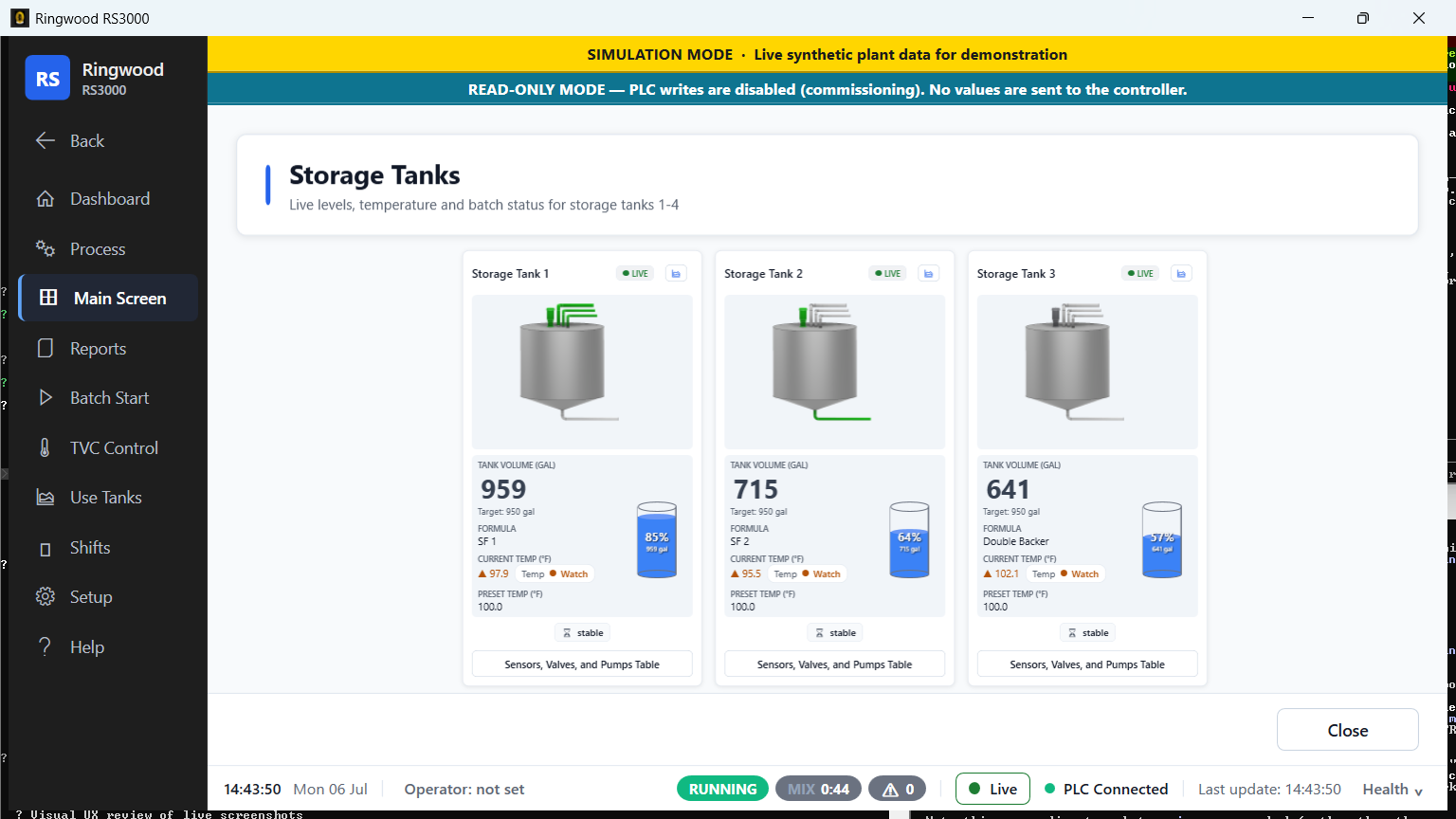
Three Use Tank windows.
Ring/Views/UseTanks/containsMF1Window,UseTank2WindowandUseTank3Windowonly. A fourth,UseTank1Window, was an unreachable clone ofMF1Windowand was deleted along with its write-surface register row; the only surviving references to it in the tree are two historical comments inRing.Tests/WriteSurfaceRegisterTests.cs(:495,:944).
Tier 2 — code-behind (everything else). The canonical shape: the constructor
calls InitializeComponent() and defers to a Loaded handler; Loaded pulls
concrete dependencies out of ServiceLocator.GetService<T>() inside a
try/catch, queries a repository, and assigns SomeGrid.ItemsSource
imperatively. PLC-facing screens add a DispatcherTimer that reads a static
snapshot and pushes values into named controls. There is no design-time
d:DataContext anywhere in the tree.
Two shapes sit between the tiers, both deliberate: InsightsScreen
(Ring/Views/Reports/InsightsScreen.xaml.cs) assigns card ViewModels to
individual child elements rather than to the screen, and DashboardView
(Ring/Views/Dashboard/DashboardView.xaml.cs) binds to a service
(DashboardService), which its XAML calls out explicitly.
Which should new code use? For a new process screen with live PLC data, use
tier 1 — a ViewModel with INotifyPropertyChanged and real bindings. For a new
report or setup screen, matching the surrounding tier-2 code is acceptable and
often clearer than a lone MVVM island. What is not acceptable is a third
pattern.
6.1a The ViewModel tier, catalogued#
Ring/ViewModels/ holds 38 files. Three of them (MakeReadyTankViewModel,
StorageTankGroupViewModel, AlarmViewModel) are named elsewhere in this
book; the other 35 are not. This section closes that gap with the same
grouped-table style chapter 07 uses for Services.
The INPC convention. There is no shared ViewModelBase or
ObservableObject base class anywhere in Ring/. Every ViewModel implements
INotifyPropertyChanged directly and re-declares its own PropertyChanged
event plus a private SetProperty<T> or OnPropertyChanged helper — the same
few lines, copy-pasted per class rather than inherited. If you add a new
ViewModel, copy this shape from an existing one; introducing a shared base
class would be a real improvement but is not the pattern today.
How they get attached — two different patterns, not one. Process-screen
ViewModels (bucket a below) are DI singletons, registered in
AddRingServices and resolved with ServiceLocator.GetRequiredService<T>() in
the View's constructor — e.g. Ring/Views/MainScreen/StorageTankGroup.xaml.cs:27-28.
Dashboard/Insights card ViewModels (bucket c) are instead new'd
directly by InsightsScreen.xaml.cs's code-behind, one per View instance,
each falling back to ServiceLocator.GetService<T>() inside its own
constructor for any repository or query service it needs
(InsightsScreen.xaml.cs:171-196) — a hybrid that is neither full DI nor a
plain object graph. Small per-item helper ViewModels like TankCardViewModel
are simply new'd by the group ViewModel that owns them, one per roster slot
(StorageTankGroupViewModel.cs:258), and never touch DI at all.
(a) Process-screen ViewModels — ViewModels/MainScreen/ (15 files)#
| File | Responsibility |
|---|---|
MakeReadyTankViewModel.cs |
The Make Ready Tank (mixer) hero: current batch step, ingredient, agitator state |
MrtImageResolver.cs |
Pure: PLC batch op-code + agitator bit → MRT vessel image filename |
ProcessFlowMap.cs |
Pure: which pipe/connector carries product for a given batch operation code |
ProcessOverviewViewModel.cs |
The whole-plant "Live Process" screen; composes the existing singletons plus its own TVCViewModel; read-only, no PLC access itself |
StorageTankDetailViewModel.cs |
Read-only detail for one generic storage-tank slot with no dedicated legacy window |
StorageTankGroupViewModel.cs |
The Storage Tank Group screen — up to 4(+) columns of tank state, global system status |
StorageTankImageResolver.cs |
Pure: three activity bits → storage-tank glyph filename |
TVCViewModel.cs |
The TVC screen: overall TVC tank plus a collection of per-storage-tank cards |
TankCardViewModel.cs |
Per-tank card state for the Storage Tank Group screen, one per roster storage slot |
TankTemperatureClassifier.cs |
Pure: actual-vs-preset temperature → Normal/Warning/Alarm, shared by TVCViewModel and StorageTankGroupViewModel |
TvcStorageTankCardViewModel.cs |
Per-storage-tank card for the TVC group screen |
UseTankCardViewModel.cs |
Per-tank state for one Use Tank (doser) card |
UseTankComponentRow.cs |
Row model for a use-tank card's "Sensors, Valves, and Pumps" popup |
UseTankGroupViewModel.cs |
The Use Tank Group screen; composes UseTankCardViewModels, one per roster doser slot |
UseTankImageResolver.cs |
Pure: five activity flags → use-tank vessel image filename |
Plus ViewModels/UseTanks/PerUseTankWindowViewModel.cs — the base for the
per-tank drill-down windows (MF1Window, UseTank2/3Window).
(b) Shell and chrome ViewModels — flat in ViewModels/ (6 files)#
| File | Responsibility |
|---|---|
PlcHealthDrawerViewModel.cs |
Singleton diagnostics observer for the PLC Health drawer |
PlcConnectionStatusViewModel.cs |
App-wide singleton PLC connection status |
DemoModeBannerViewModel.cs |
Singleton banner for demo/training mode |
ClockViewModel.cs |
Singleton wall-clock for the bottom status strip |
BatchStatusStripViewModel.cs |
Singleton app-wide batch/alarm status for the status-strip pills and MainWindow banner |
AlarmViewModel.cs |
Alarm grid — PLC cache in one phase, SQLite event log and silence latch in the other |
(c) Dashboard/Insights card ViewModels — flat in ViewModels/ (10 *CardViewModel files)#
There is no ViewModels/Dashboard or ViewModels/Insights folder — despite
the name, every card ViewModel lives flat alongside the shell ones above.
InsightsScreen.xaml.cs assigns each to one child element's DataContext
(the pattern §6.1
already names in passing):
| File | Responsibility |
|---|---|
AlarmLoadCardViewModel.cs |
Insights "Alarm Load" — worst-first ranked catalog alarms for the week |
BatchEtaCardViewModel.cs |
Predicts running-batch completion time from historical per-step medians |
CookTemperatureCardViewModel.cs |
Per-tank mean/spread cook-temperature rows for the day |
GlueLineRunDryCardViewModel.cs |
Projects when the mixed-glue inventory feeding the corrugator runs dry |
GlueUsedCardViewModel.cs |
Delivered glue volume plus derived dry-starch pounds over a date range |
LastBatchCardViewModel.cs |
Small "last batch" tile (tank/formula/time/volume), populated externally |
SpendCardViewModel.cs |
Ingredient cost, giveaway money, aborted write-off for the week |
StockForecastCardViewModel.cs |
Worst ingredient slots by remaining runway to empty |
YieldAggregateCardViewModel.cs |
Windowed yield/giveaway aggregate, broken into per-formula or per-tank rows |
YieldScorecardCardViewModel.cs |
Grades the most-recent completed batch's yield%/giveaway%/cycle time |
(d) Everything else — flat in ViewModels/ (6 files)#
Cards in spirit but not in name, plus two dashboard-only pieces:
| File | Responsibility |
|---|---|
DashboardGraphViewModel.cs |
Dashboard/Insights "Trends" chart — series built from completed-batch SQLite rows |
DashboardKpiStripViewModel.cs |
The dashboard's 4-tile KPI strip (batches this shift, dry starch, soonest tank low, batches queued) |
EmailHealthViewModel.cs |
Dashboard "Email Health" card (SMTP configured?, last send, success/fail counts) |
EquipmentHealthViewModel.cs |
Dashboard "Equipment health" card; a 3-state enum avoids a false all-clear green |
IdleFormulaStepsViewModel.cs |
Idle-dashboard formula-steps panel — the last completed batch's recipe when nothing is running |
TankAttentionViewModel.cs |
Singleton, read-only: ranks the 1–3 tanks most needing operator attention, composed from the StorageTankGroupViewModel/UseTankGroupViewModel singletons |
That is 15 + 1 + 6 + 10 + 6 = 38, matching the directory listing exactly.
6.2 The shell#
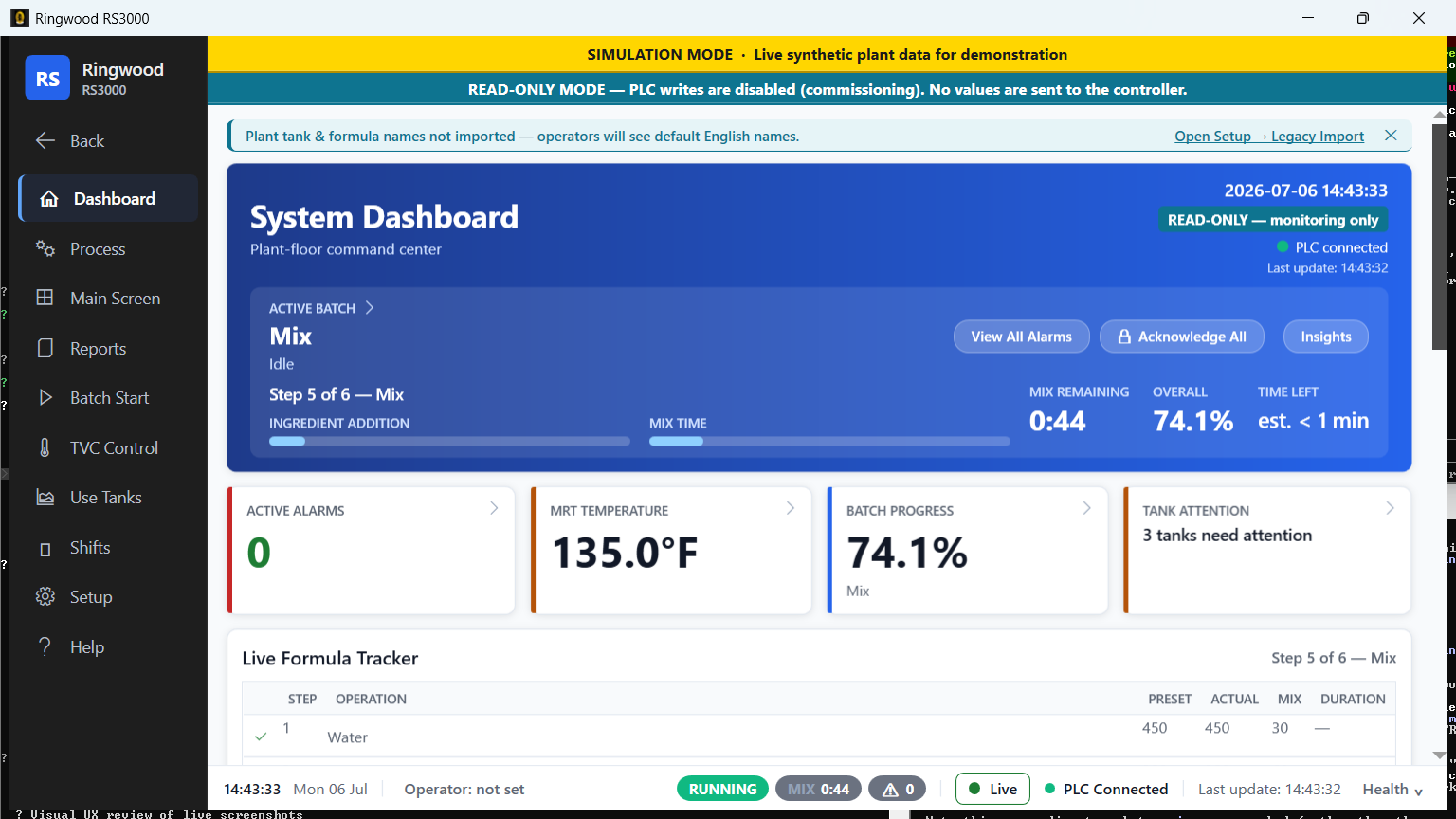
MainWindow#
Ring/Views/MainWindow.xaml(.cs) owns the window chrome, the shared
MainContentArea ContentControl, the nav history stack, the PLC watchdog
tick, the alarm pump, the auto-reprobe and the UI-hang sentinel
(cadences in chapter 02 §2.5).
A rename-freeze item lives here. MainWindow.NavigateBack() branches on
t.Namespace != null && t.Namespace.StartsWith("Ring.Views.BatchStart", StringComparison.Ordinal)
(Ring/Views/MainWindow.xaml.cs:640) to decide whether Back re-creates a screen
or reuses the cached instance. The four Batch Start screens assume a first-time
Load. Rename that namespace and Back silently switches them to instance reuse
— a behaviour change that compiles cleanly. See
ARCHITECTURE.md.
NavBar#
Ring/Views/UserControls/NavBar.xaml(.cs) is the single menu surface. Two
structural facts:
- Views are cached singletons.
GetOrCreateView<T>()(NavBar.xaml.cs:89) returns a retained instance. This is whySetpointEchoGuardstate survives navigate-away and why every setpoint window mustReset()and re-seed inLoaded(chapter 04 §4.8). - Several menus are built from the tank roster, not from literals.
PopulateRosterTankMenus()runs afterInitializeComponentand builds buttons in code (NavBar.xaml.cs:124-130).
The hosted-screen pattern#
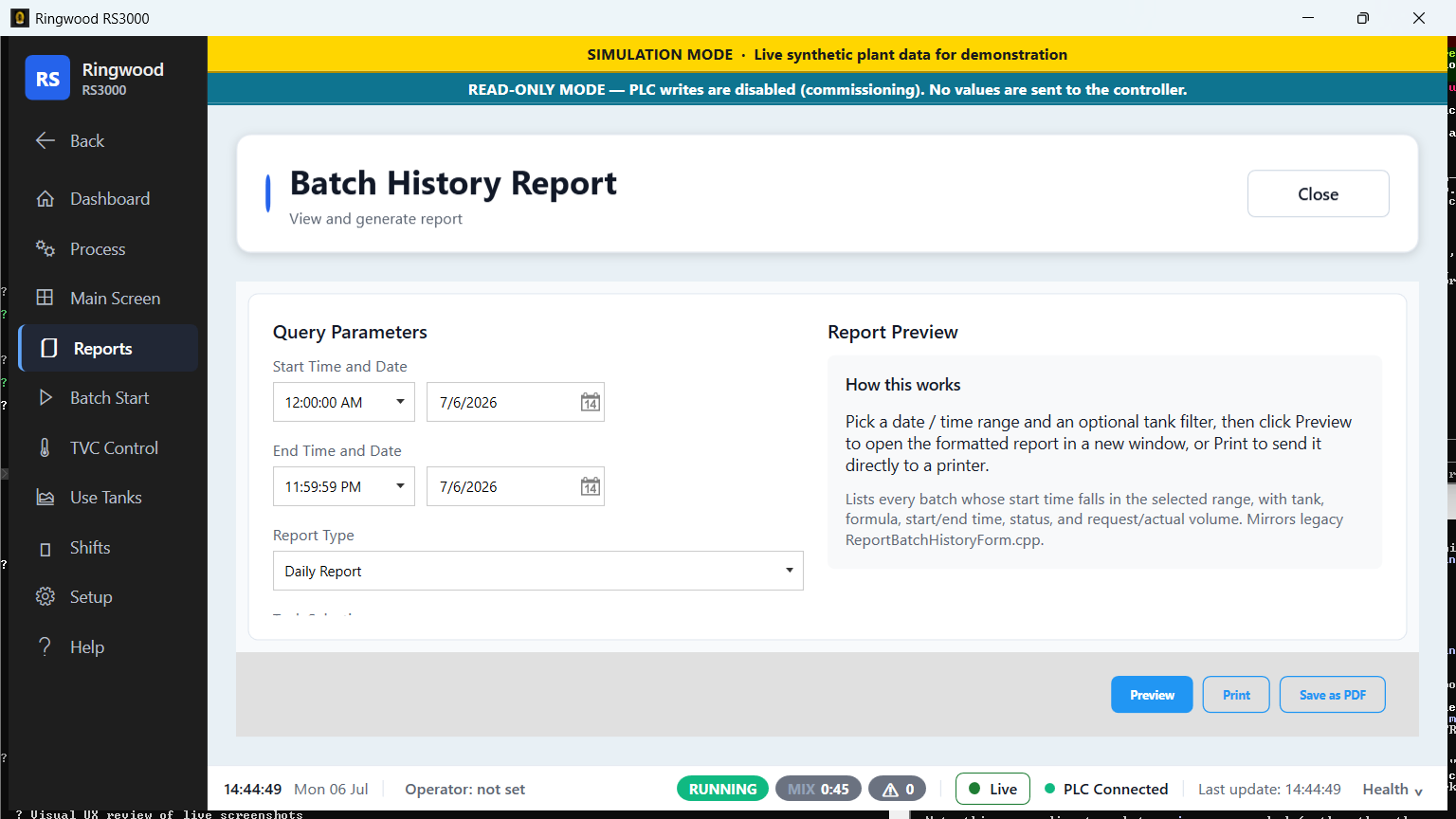
Reports and most setup screens do not go into MainContentArea directly.
They are placed inside a ReportHostView
(Ring/Views/Reports/ReportHostView.xaml(.cs) — note it lives under
Views/Reports/, not Views/UserControls/), which paints the shared header and
the back/close affordance and hosts the real screen in its ReportContent
dependency property (:24-25).
Navigation goes through the statics on ReportHostView:
| Static | Use |
|---|---|
ShowReportInMainContent(context, title, reportContent) |
:212 |
ShowHostedInMainContent(context, title, subtitle, hostedContent) |
:218 |
ShowHostedLocalized(context, titleKey, subtitleKey, hostedContent) |
:241 |
ShowHostedLocalizedSubtitle(context, title, subtitleKey, hostedContent) |
:262 |
NavigateMainContentToDashboard(context) |
:200 |
The localized variants bind the header via SetResourceReference
(:111, :118), so the host header re-localizes live on a language switch
rather than freezing the string it was given.
Authoring hazard: the double header. A hosted screen that paints its own title row produces two headers. Twenty-three files under
Ring/Views/carry a comment recording that their banner was deleted for exactly this reason (verified by grep). Nothing enforces it — if you add a hosted screen, do not give it a title row.
FitHost#
Ring/Views/UserControls/FitHost.cs is a Decorator that hosts a single child,
measures it at the full available width but unbounded height — so its
internal star/proportional layout resolves exactly as it would unscaled, unlike
a Viewbox, which measures at infinite width and collapses star columns — and
then uniformly scales it down to fit the viewport. Scale is never > 1;
content is never blown up. It exists so fixed-layout screens survive a plant
display at 1080p/125% DPI without scrolling or clipping.
The rule that matters, from its own doc (:19-21): "Use ONLY on structural
screens (cards, mimics, forms). Do NOT wrap a virtualized DataGrid:
measuring at unbounded height would realize every row. Data-table screens keep
inner scroll."
ChildVerticalContentAlignment (:38-50) is an opt-in: the default Top
reproduces the historical arrange byte-for-byte, Stretch lets a screen fill
the dead vertical gutter, Center centres it — and in the downscaled regime
all values fall back to the exact anti-clip top-anchored arrange, so clipping
protection is never affected. The pure geometry lives in the static, testable
FitHost.ComputeChildArrange.
6.3 The screen areas#
| Directory | Contains |
|---|---|
Views/MainScreen/ |
The process screens: MakeReadyTank, CausticAndBorax, StorageTankGroup, StorageTankDetailWindow, UseTankGroup, TVC, ProcessOverview, Silo, BulkCausticTank, ReceivingHopper, ReceivingVerificationScreen, Viscometer, DataEntryHub / DataEntryForm |
Views/Dashboard/ |
DashboardView — the KPI/at-a-glance screen, bound to DashboardService |
Views/Process/ |
Alarm — the alarm screen; its AlarmSilence_Click reaches AlarmViewModel.TryWriteAlarmSilence and is a registered write-surface dispatcher |
Views/BatchStart/ |
The four arming screens (StorageTank1/2/4, Lowmidtank) plus their pure policy types: BatchStartEligibility, BatchSizePrecondition, FormulaVolumePrecondition, BatchStartLevelRange, BatchStartLevelUnits, SplitTankMapping, PendingBatchConfig, BatchConfirmationSummary, BatchStartStrings |
Views/TVCcontrol/ |
The four per-tank TVC windows plus TVCWindowPlcBridge (the queue dispatcher), TvcAgitatorCycleController, TvcSetpointSeedPlan / TvcSetpointSeeder, TvcWindowOptionModel, TvcWindowRowGate, TvcPresetDisplay |
Views/UseTanks/ |
MF1Window, UseTank2Window, UseTank3Window plus UseTankWindowPlcBridge, UseTankSetpointSeedPlan / UseTankSetpointSeeder |
Views/Setup/ |
~40 supervisor/admin screens and dialogs: formula edit and exchange, tank roster, group hardware, tank/group names, inventory edit, costs, analytics, plant profile, shifts, language, units, credential rotation, database backup, factory reset, database export, diagnostic console, DisplayCommunicationForm, TagInspector, TimeDateForm, maintenance, scale calibration, legacy import |
Views/Reports/ |
~27 report screens plus ReportHostView, the CSV builders and the pure row-projection types |
Views/Shifts/ |
ShiftControl (note: its x:Class is Ring.Views.Shifts.ShiftControlView), ShiftHandoffScreen, ShiftHandoverScreen, ShiftProductionLogScreen |
Views/Help/ |
ManualsLibraryScreen, AlarmLegendScreen, ContactUs |
Views/Wizard/ |
StartupWizardWindow and its steps, including ReadOnlySafetyStep and FinishStep |
Views/UserControls/ |
NavBar, FitHost, ScreenHeader, ScreenHelpButton, ToastHost, PlcHealthDrawer, LinkStateBadge, HealthChip, AlarmTriageBadge, PlaybookPanel, the mini charts and live vessel thumbs |
Controls/ |
NumericKeypad + KeypadBehavior (touch numeric entry), TankLevelControl |
Nine of these screen files are UiDispatch rows on the write-surface
register — meaning the register asserts an operator gesture reaches a writer
through them, and Every_UI_dispatch_screen_on_the_write_surface_can_actually_be_reached
proves each is still constructible. See
chapter 04 §4.10.
6.4 Resource dictionaries and theming#
Ring/Views/App.xaml merges, in this order:
- MahApps.Metro
Controls.xaml,Fonts.xaml,Themes/Light.Blue.xaml Resources/Colors.xaml→Resources/Tokens.xaml→Resources/Components.xaml— "MUST stay in this order, because Tokens references Colors brushes and Components references both" (App.xaml:17-19)Resources/RingTheme.xaml— the Wave-2 semanticRing*token system, merged last among the theme dictionaries so screens migrate toRing*keys incrementally without breaking Wave-1 consumersResources/Strings/Strings.en.xaml— English last of all
Two token systems coexist deliberately. Values are converged where it matters:
the legacy PrimaryColor is #2563EB, the same brand blue as
Ring.Color.Accent, "so legacy-styled and Ring-styled buttons paint the SAME
brand blue" (App.xaml:47-50).
Touch and legibility conventions#
From Ring/Resources/Tokens.xaml:
| Token | Value | Note |
|---|---|---|
MinTouchTarget |
44 |
explicitly labelled "Touch target minimum (accessibility)" (:23-24) |
Font.Caption / Font.Body / Font.Value |
13 / 14 / 16 | |
Font.ValueCritical |
20 | the size for a number an operator must read across a bay |
Font.H3 / H2 / H1 |
16 / 20 / 28 | |
Radius.Control / Radius.Card |
6 / 8 | |
Space.S / Space.M / Space.L |
8 / 12 / 12 |
Type-scale TextBlock styles (Heading1Text and siblings) are defined on top of
those sizes, so a new screen should reach for a style, not a literal FontSize.
Touch entry itself is served by Ring/Controls/NumericKeypad.xaml +
KeypadBehavior.cs, which is the sanctioned way to take an operator number on a
touchscreen — and Ring/Services/Display/OperatorNumberInput.cs /
LocalizedInput.cs are the locale-tolerant parsers behind it.
6.5 Localization — the thirteen-dictionary rule#
Thirteen locale dictionaries under Ring/Resources/Strings/ (verified by
listing): en, nl, de, fr, es, it, pt, tr, pl, ko, ja,
zh-Hans, zh-Hant.
The rules#
- A new user-visible string goes into all thirteen dictionaries, in one
commit. A per-locale parity test fails otherwise
(
Ring.Tests/LocalizationServiceTests.cs,Satellite_IsFullParityMirror_OfEnglish(string code),:239-241), and it checks placeholder parity ({0}/{1}) as well as key parity sostring.Formatstays safe (:262). - Never create a duplicate
x:Key. WPF throws while loading the dictionary — which happens before the first frame — so the app dies at startup with no window and a bare crash log. - English is merged last and stays last.
Strings.en.xamlis the base and the permanent fallback, so a key missing from an overlay still resolves rather than rendering blank. Do not change the merge order inApp.xaml; the file says so in a comment (App.xaml:30-38). - Every key referenced from XAML must exist in the English dictionary —
ReferencedLocalizationKeys_AllExistInEnglishDictionary(:445-446). - Watch for mojibake. Dictionary values have shipped double-encoded (a
cp1252 round-trip) before, and neither the build nor the rest of the suite
caught it, because the values are still valid UTF-8 and still parity-complete.
A dedicated test scans for the signature bigrams (
Dictionary_HasNoMojibake,:329-331). If it fires, do not "fix" it by retyping the character — repair the encoding (read the bytes back through the cp1252 round-trip) and save UTF-8 without BOM.
How switching works#
Ring/Services/Display/LocalizationService.cs:
SupportedLanguages(:58) is the list ofLanguageOptions — code, English name, endonym, overlay URI.SupportedLanguages_AreThirteen_WithUniqueCodespins the count (LocalizationServiceTests.cs:388).SetLanguage(code)(:127) swaps one overlay dictionary inApplication.Current.Resources.MergedDictionaries, deliberately excluding the English base from removal (:225-232). EveryDynamicResourcebinding repaints live; no restart.ApplySavedLanguage()(:106) reads the persisted choice from theAppStatetable at startup (phase 7).- A
LanguageChangedevent (:86) exists for strings composed in C#, which XAML cannot repaint. LocalizationServicedeliberately never touchesCurrentCulture/CurrentUICulture(:23). Display language and number formatting are kept separate on purpose: batch math and PLC value formatting must not change because an operator picked Dutch. This is the same concern that makesPlcTagWriter.TryParseRealInvariantinvariant-only (chapter 04).
The known gap#
Alarm operator text lives in SQLite in English only. That is a schema
change, not a dictionary edit, and is on the deferred list
(ARCHITECTURE.md).
So is the fact that C#-composed text does not live-repaint on a language change
— hence the LanguageChanged event.
For code that must resolve a localized string from a non-XAML context, the house
pattern is a LocalizedOrFallback(key, englishFallback) helper that reads
Application.Current?.TryFindResource(key) and falls back to the English
literal, with the whole thing wrapped so a test host with no Application gets
the literal — see ConfigurationValidator.cs:517-524 and the equivalents in
DashboardService and PcWriteInteger30StrandedBitMonitor. The commissioning
holds follow the same convention: each exposes a …ResourceKey constant and a
…Fallback string side by side (e.g.
TankTempModeWriteAuthorization.NotAuthorizedResourceKey / …Fallback).
6.6 Converters#
Ring/Converters/ holds thirteen value converters. The freshness family is the
one worth knowing about, because it is how a screen refuses to lie:
| Converter | Purpose |
|---|---|
FreshnessConverterHelper, FreshnessToCaptionConverter, FreshnessToOpacityConverter |
render the DataFreshnessClassifier verdict as caption text and dimming |
PlcConnectionStateToBrushConverter |
link state → colour |
StateToBrushConverter, StateToGlyphConverter, ValueToHealthConverter, VarianceToBrushConverter, AlarmSeverityDisplayConverter |
status painting |
BooleanToOnOffConverter, EmptyToPlaceholderConverter, ProgressBarValueConverter, ReceivingTankVisibilityConverter |
general formatting |
Numeric display itself is not a converter concern:
Ring/Services/Display/PlcDisplayFormatter.cs is the single source of truth for
PLC-value formatting and UnitDisplay.cs is the unit-aware layer around it.
DisplayUnitService owns the station's chosen display units and is display
only — it never changes how a value is stored or written.
6.7 The UI rule that is a safety rule#
Never put a UI guard or an early return in front of a shared handler that
also dispatches PLC-write buttons.
This is in CLAUDE.md and
CONTRIBUTING.md, and the live implementation is
NavBar.HandleButtonClick (Ring/Views/UserControls/NavBar.xaml.cs:415-444).
Most buttons in that handler swap MainContentArea.Content, and before such a
swap the handler honours the hosted setup editor's unsaved-changes guard —
otherwise a NavBar click silently discards a dirty editor's edits. But not every
button navigates. The handler therefore carries two explicit exclusion sets:
bool isPopupToggle =                       // the nine top-level menu buttons
    buttonName == "ProcessButton" || ... || buttonName == "HelpButton";

bool isNonNavAction =
    buttonName == "HoldButton" || buttonName == "ProcessResumeButton" ||
    buttonName == "ProcessResetButton" || buttonName == "StartPlcMonitoringButton" ||
    buttonName == "LockSetupButton" || buttonName == "CommunicationDiskLoggingButton" ||
    buttonName == "UpdateProcessorTimeDateButton";

if (!isPopupToggle && !isNonNavAction && !ConfirmLeaveHostedContent())
    return;   // operator chose to keep editing — abort the navigation
The comment at :426-429 states the hazard in one sentence: those buttons "must
NEVER run the guard — it would pop a misleading 'discard?' prompt and, if the
operator keeps editing, ABORT a process command (e.g. a live Hold)."
The same reasoning explains why the roster-generated per-tank menu buttons get a
dedicated click handler rather than being routed through the shared one
(NavBar.xaml.cs:124-129): so tank navigation never travels through the handler
that fronts the Hold / Resume / Reset write buttons.
Before you add any guard to a shared handler, enumerate every button routed to it. Adding a confirmation to a handler you believe is "just navigation" is the exact shape of this defect.
A related, milder rule from MainWindow: the roster restart lock deliberately
gates polling (reads) only — it "is not in front of any PLC-write button" —
which is precisely why RosterWriteIndex needs its own write-side locks
(chapter 04 §4.3).
6.8 UI debt, deliberately deferred#
None of this is on fire; all of it is parked past the cutover
(ARCHITECTURE.md):
- Per-tank screen family consolidation (UseTanks → TVC → BatchStart), with three ordered prerequisites: a composite cache key, behavioural tests on WPF-free policy objects, and a controls decision on split options.
StorageTankGroupViewModelcarries a half-finished migration — five flat property consumers still need repointing atTankCards.DashboardViewis hardcoded around the legacy tank count; six-tank support wants anItemsControl.ServiceLocatorretirement and ambient-state → DI conversion.
Next: 07 — Services Catalog.
Verified against#
Every claim in this chapter was read out of these files on 2026-09-01:
Ring/Views/App.xaml · Ring/Views/MainWindow.xaml.cs ·
Ring/Views/UserControls/NavBar.xaml.cs ·
Ring/Views/UserControls/FitHost.cs ·
Ring/Views/Reports/ReportHostView.xaml.cs ·
Ring/Views/ (full directory listing, all areas) ·
Ring/ViewModels/ (full directory listing) ·
Ring/ViewModels/MainScreen/StorageTankGroupViewModel.cs,
TankCardViewModel.cs · Ring/ViewModels/LastBatchCardViewModel.cs,
SpendCardViewModel.cs, BatchEtaCardViewModel.cs, ClockViewModel.cs ·
Ring/Views/Reports/InsightsScreen.xaml.cs ·
Ring/Views/MainScreen/StorageTankGroup.xaml.cs ·
Ring/Infrastructure/DependencyInjection/ServiceCollectionExtensions.cs ·
Ring/Resources/Tokens.xaml, Colors.xaml, Components.xaml,
RingTheme.xaml, Strings/ (listing) ·
Ring/Converters/ (listing) · Ring/Controls/ (listing) ·
Ring/Services/Display/LocalizationService.cs ·
Ring/Infrastructure/Configuration/ConfigurationValidator.cs ·
Ring.Tests/LocalizationServiceTests.cs ·
Ring.Tests/WriteSurfaceRegisterTests.cs · ARCHITECTURE.md ·
CONTRIBUTING.md